Runtime Accessible Class Attribute Docstrings in Python
Update (Jan 2, 2025): Improved language and image from feedback.
Update (Jul 4, 2026): Improved language and add summary table.
In this post, I want to show you how to access the docstrings defined as string literals1 below class attributes like this:
|
|
By runtime accessible I mean that, given a class and the name of an attribute, a function returns the docstring of the attribute. I.e. a function like this:
|
|
This has been a long-standing issue for many Python users, but is still not integrated in the language or standard library. Various tools, e.g. documentation tools such as Sphinx and Griffe, have solved this issue internally in a similar way to how I did. Unfortunately, I was not able to find a reusable standalone solution.
An extended version of the code has been released on GitHub and as a package on PyPI.
My personal motivation was to show docstrings of parameters and enum choices in a GUI. Using this project, I was able to display the documentation of the COLOR-attribute as a tooltip:
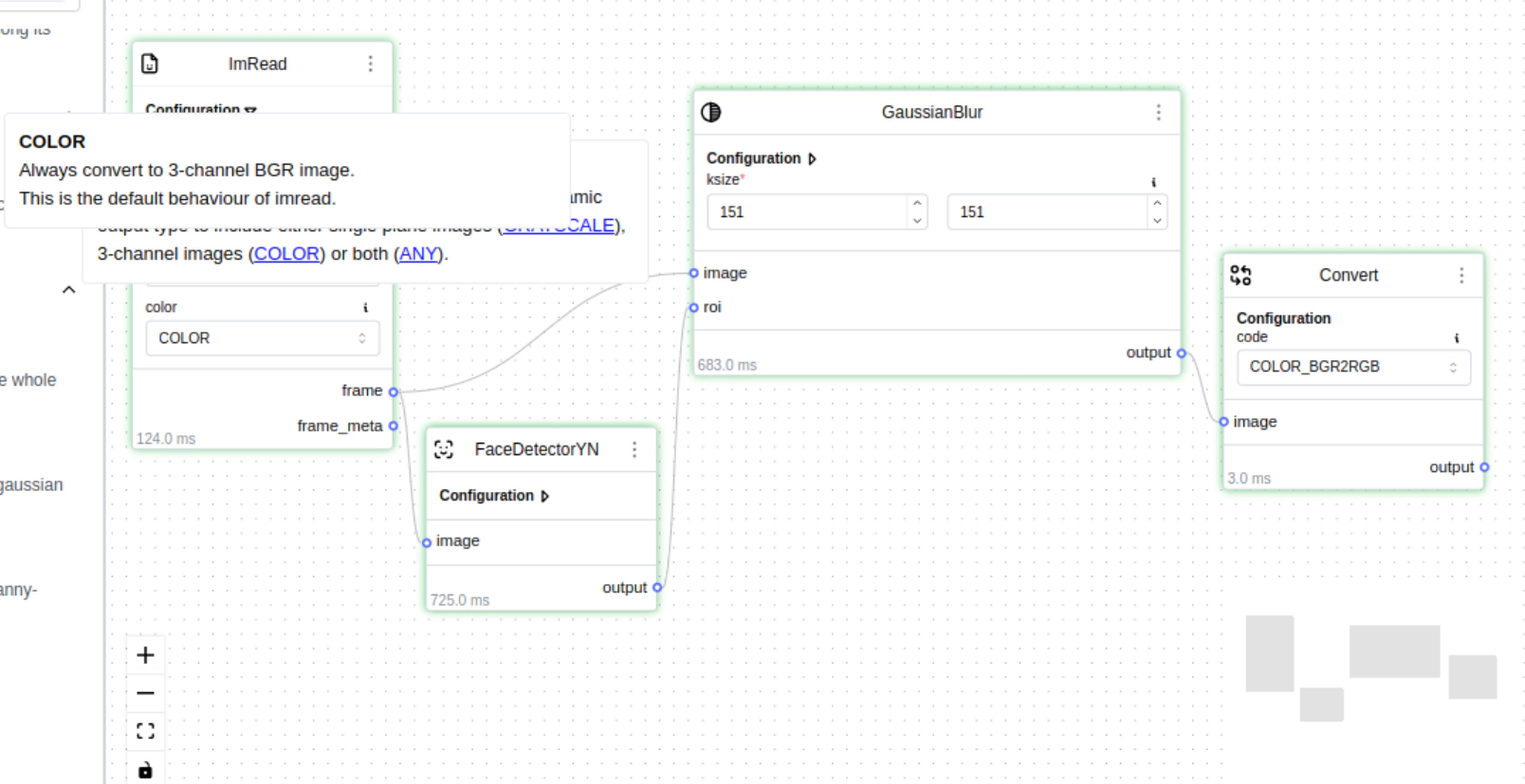
Figure 1: Screenshot from my web-based workflow editor for computer vision. The framework introspects programmatically defined Node classes to build a UI for configuring the nodes and showing documentation alongside them.
Why doesn’t this work out of the box?
Extracting docstrings of methods is easy and built into Python. You can access the docstring of methods via the __doc__-attribute.
But this does not work for class attributes, since it could lead to various problems. Just two examples:
- It could overwrite existing documentation associated with the value of the attribute.
In the following sample, the docstring of
MyIntwould be overwritten by the docstring ofFlexibleVector.scalar_type:
|
|
- Furthermore, some objects might be immutable, so you cannot simply add a
__doc__attribute to them.
Now that we have established the problem, let’s have a look at what has been tried in the past.
Background
There is a long-standing discussion about the best way to document class attributes. Let’s first have a look at what has been proposed in the past to make an informed decision on whether you should use the approach shown in this blog post.
PEP 224 (rejected)
Back in the year 2000, PEP 224 proposed exactly the syntax shown in the introduction, but was rejected.
Many people (including Guido van Rossum himself) argue that this way is bad, since the docstring is below the attribute and often directly above another attribute, which could lead to confusion.
Side note: Simply moving it above the assignment is not an option, since it would be ambiguous whether the docstring belongs to the class (or module) or the first attribute.
PEP 257 (accepted)
One year later, PEP 257 states that string literals1 directly after class attributes should be considered “attribute-docstrings”, although they will not be runtime accessible. Verbatim, it says:
String literals occurring elsewhere in Python code may also act as documentation. They are not recognized by the Python bytecode compiler and are not accessible as runtime object attributes (i.e. not assigned to
__doc__), but two types of extra docstrings may be extracted by software tools:
- String literals occurring immediately after a simple assignment at the top level of a module, class, or
__init__method are called “attribute docstrings”. […]
Hence, the Python language recognizes them as official docstrings, but won’t help us access them during runtime.
PEP 727 (draft)
An alternative approach is described in the recent (2023) PEP 727. It proposes to define the docstring as an annotation:
|
|
While this PEP has a lot of support from popular libraries and is already implemented in typing_extensions, discussion has brought up various issues,
such that the original sponsor of the PEP suggested withdrawing it.
Personally, I also don’t like the syntax, since it distracts the reader from the assignment, i.e. the actual logic of the code.
The current state of docstrings under the assignment
Summary: Since PEP 257, defining string literals after assignments in a module or class is officially recognized as “attribute docstrings”. But Python does not offer a built-in way to extract them.
In recent years, multiple popular projects support the syntax initially proposed in PEP 224:
- Griffe, which is the library used by the Python handler of mkdocstrings to extract all information from Python files to display them in mkdocs documentation.
- Pydantic (since version 2.7), which populates the description of fields with the attribute-docstring.
There are further discussions2 3 if you are interested in more technical arguments. During my research, I found various interesting alternatives, which I present in a separate section. You can then decide for yourself which solution suits you best.
My verdict: Since I use both of these projects, don’t mind the syntax, and wanted to access the docstrings of class attributes to show them as tooltips in a GUI, I decided to implement this as a reusable standalone solution.
Next, I want to quickly explain how the solution works. This is a highly optional read, and you can directly skip to Limitations or Alternatives.
Implementation
You can find an extended implementation usable as a package on GitHub and PyPI.
Instead of implementing the function in the introduction directly, we implement a function which extracts all attribute docstrings as a mapping. A convenience function, just returning the requested attribute’s docstring, can be easily implemented.
The implementation can be divided into three steps:
- Extract source code using the
inspect-module - Parse it using the
ast-module to get an abstract syntax tree (AST) - Extract the attribute docstrings from the AST with an
ast.NodeVisitor
In code, this looks as follows:
|
|
What remains to implement is the AttributeDocstringVisitor.
To understand what we have to do, let’s have a look at the dumped AST of the class from the introduction:
|
|
We have to go through all statements in the body of a ClassDef to find Expr nodes containing Constant nodes whose values are strings, if they follow AnnAssign (or Assign) nodes.
This value is also the docstring, which we have to store.
To build the mapping, we can get the attribute name from the AnnAssign node’s target-id.
For Assign nodes, we additionally have to handle possible multiple targets.
|
|
The NodeVisitor implements the visitor design pattern.
When it encounters a node (e.g. ClassDef), the visitor automatically calls the corresponding method (visit_ClassDef).
After visiting a class, the docstrings will be in visitor.docs.
That is all there is.
Limitations
- Source Code Access: This implementation requires access to the source code via
inspect. If this is not possible (e.g. when the class is defined in a REPL), then it will fail and return no docstrings. - Inheritance (solved in full version): The implementation above does not consider inherited attributes, since it only parses the specified class. This can be alleviated by traversing the parent classes in the MRO and parsing them until the attribute and its docstring were found.
- Inner Classes (solved in full version): The implementation above does not ignore inner classes. It will add all attributes of inner classes to the dictionary.
Alternatives
Before diving into the details, here’s a quick overview of the alternatives covered below:
| Approach | Works for | Runtime accessible | Trade-off |
|---|---|---|---|
| Class docstring | Any class | Yes, via a docstring parser | Mixes attribute docs into the class docstring; tied to your docstring style |
enum-tools @document_enum |
Enums only | Yes | Same AST-based approach as this post, specialized for enums |
| aenum | Enums only | Yes | Requires different syntax (value + docstring as a tuple) |
| Value as docstring | Enums only | Yes | Only works if you don’t need meaningful values (auto-incrementing) |
| PEP 727 | Any class | Yes, via Annotated |
Interrupts the assignment; may end up withdrawn |
| Guido’s dunder attribute | Any class | Yes | Simple, but fragile: breaks silently on rename |
Sphinx #: comments |
Any class | No | Compatible with Sphinx, but not accessible at runtime at all |
In the docstring of the class
Some people argue that the docstring of class attributes is closely tied to the class and should therefore be documented there. The actual syntax depends on your docstring style. Here’s an example using Google-style docstrings:
|
|
Then you can use a docstring parser (e.g. docstring_parser) to extract the information.
|
|
While I understand this argument, I’d rather not mangle docstrings too much and prefer a solution which is more integrated in the language.
Enums
Since documentation of enums is a common use-case of class attribute docstrings, here are some specialized options, which only work for enums:
enum-tools decorator
The library enum-tools offers the class decorator @document_enum to extract the docstrings of the attributes of an enum.
It also traverses the AST as we do, but is more specialized for enums.
|
|
aenum
Requires slightly different syntax:
|
|
Value as docstring
If you are fine with auto-incrementing values, you can set the docstring as the value.
This approach rewrites the value as the __doc__ attribute
and automatically increments the actual value and assigns it in a custom enum class.
PEP 727
PEP 727 is already implemented in typing_extensions and is here to stay for backwards-compatibility.
It remains to be seen if this approach still manages to get a foothold, since
some popular libraries prefer it.
The decision here might depend on your ecosystem (i.e. the libraries you are using) and personal preference for the syntax.
Guido van Rossum’s suggestion from 2000
Defining the docstring as a special dunder attribute:
|
|
You can then use getattr(cls, f"__doc__{attr_name}__") to access the docstring.
Works, but that’s it. Be careful when renaming. To my knowledge, this approach is not very widespread.
Non-alternative: Poor Sphinx users
Sphinx has a directive for documenting class attributes.
|
|
This approach is even more difficult to access at runtime, since comments are not stored in the AST at all. The advantage is that it is compatible with Sphinx. There is probably a way, since Sphinx can access it, but I did not research how.
Alternatively, you can use the attribute docstrings with Sphinx.
Summary
Extracting the attribute docstrings from the source is not difficult. It is somewhat limited by requiring source code access at runtime. There are various alternatives, each having their own trade-offs.
I will be using the method presented in this post, since it follows the syntax officially recognized in PEP 257 and is compatible with various tools such as Pydantic and mkdocs.
-
A string literal is simply a hard-coded string. In most languages, you would assign a string to a variable (e.g.:
x = "Hello World") or use it as part of an expression (e.g.",".join(["my", "list", "of", "strings"])). But in Python you can also put a string literal in a standalone line. If it appears below a function signature or class declaration, it is interpreted as a docstring. ↩︎ ↩︎ -
Original mailing list discussion of PEP 224. Interestingly mentions that this is one of the first publicly discussed PEPs. ↩︎